
Download Quick View Plus – file viewer, document viewer, PDF viewer, PSD viewer, GIF viewer, universal file access, email integration, multi-platform support, document management, file management
Overview
Quick View Plus is a utility application designed to simplify the process of accessing and viewing various file formats directly from a user’s device. Targeted at professionals and individuals who frequently handle diverse document types, the app eliminates the need for installing multiple software tools to open files such as PDFs, PSDs, and GIFs. By offering universal file access, Quick View Plus streamlines document management and enhances productivity, particularly in environments where file compatibility across platforms is critical.
The application supports multiple operating systems, including Windows, DOS, and Macintosh, which allows users across different computing environments to access files without format conversion or dependency on specific software. This multi-platform capability makes it a valuable tool for teams working in mixed OS environments or individuals who switch between devices. Its integration with popular email clients such as Outlook and Eudora further enhances its utility by enabling users to view attachments directly within their inbox, reducing workflow interruptions.
Although the developer did not provide additional technical details, the app’s core function centers on file accessibility and ease of use. For users managing digital documents, Quick View Plus offers a lightweight solution to view, copy, and print files without the overhead of full-featured editors. Its release in 2007 reflects a time when file compatibility and cross-platform access were emerging challenges in productivity software. Today, it remains relevant as a niche tool for legacy file handling and document viewing.
Key Features & Functionality
- Universal File Access: Supports direct viewing of multiple file formats including PDF, PSD, and GIF without requiring the original software. This is especially useful for users who receive files in proprietary formats but lack the tools to open them.
- Multi-Platform Support: Designed to function across Windows, DOS, and Macintosh systems, enabling consistent file access regardless of the underlying operating environment.
- Email Integration: Seamlessly integrates with email clients like Outlook and Eudora, allowing users to open and view attachments directly from their inbox without switching applications.
- Easy File Management: Users can copy, print, and manage files from various formats within the same interface, reducing the need to launch multiple programs.
- User-Friendly Interface: Features a straightforward layout that prioritizes accessibility, making it suitable for both experienced users and those less familiar with technical software.
For example, a graphic designer receiving a PSD file from a client can open and review it immediately without installing Adobe Photoshop. Similarly, a business user can view a PDF report attached to an email without opening a separate PDF reader. These real-world use cases demonstrate how Quick View Plus enhances efficiency by minimizing software dependencies and streamlining document workflows.
Interface, UX & Performance
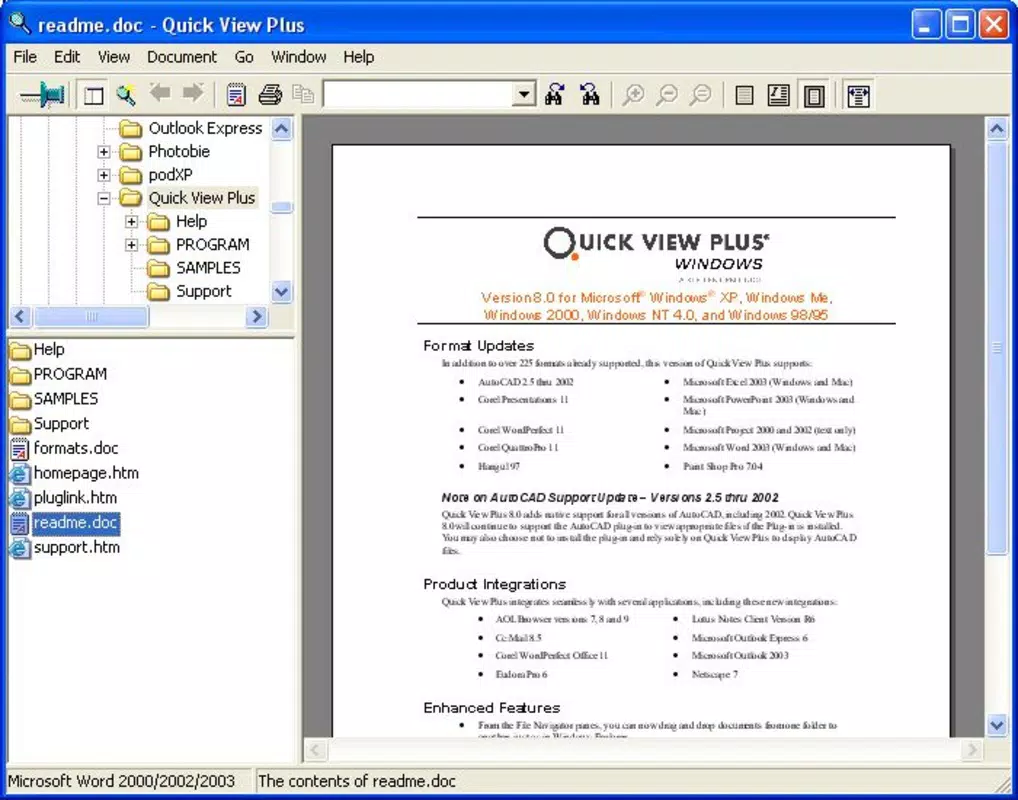
Quick View Plus presents a clean and minimal interface focused on file accessibility. The layout prioritizes simplicity, with a central viewing area and a sidebar or toolbar for navigation and file operations. Users can open files directly through drag-and-drop or file browser integration, ensuring a smooth onboarding experience.
Navigating between files is intuitive, with clear labels and consistent controls across supported platforms. The app’s responsiveness is optimized for basic file viewing tasks, allowing users to scroll through documents, zoom in on images, and print content with minimal delay. Although the developer did not list formal performance metrics, the application’s lightweight size of 1.8 MB suggests efficient resource usage, which benefits older or low-spec systems.
Stability appears to be a core design focus, as the app is built to handle file rendering without crashes during typical use. However, specific compatibility with modern hardware or updated OS versions was not disclosed. Users on contemporary systems may encounter limitations due to the app’s age and lack of updates. Despite this, the interface remains functional and predictable, minimizing user frustration during file access tasks.
Platform Compatibility & Technical Requirements
Quick View Plus is available on Windows, DOS, and Macintosh platforms. The application runs on systems that support these operating environments, though specific version requirements were not listed. The file size is 1.8 MB, indicating a compact footprint suitable for systems with limited storage or older hardware.
Although the developer did not specify minimum OS requirements, the app’s compatibility with DOS suggests it may function on legacy systems. Users seeking to install it on modern operating systems should verify compatibility, as support for older software on current platforms may be limited. The lack of mobile or cloud-based availability was not mentioned, suggesting the app is designed for desktop environments.
Pros and Cons
Pros
- Supports a wide range of file formats including PDF, PSD, and GIF.
- Eliminates the need for multiple software installations.
- Integrates with popular email clients for direct attachment viewing.
- Lightweight size (1.8 MB) ensures efficient performance on older systems.
- Simple, intuitive interface suitable for users of all skill levels.
Cons
- Released in 2007; may lack compatibility with modern operating systems.
- Platform availability limited to Windows, DOS, and Macintosh.
- No information on updates, security patches, or support channels.
- Does not support mobile or cloud-based file access.
- Specific technical requirements were not disclosed.
FAQ
Is Quick View Plus available for mobile devices?
The developer did not specify mobile compatibility. The app is designed for Windows, DOS, and Macintosh platforms.
Can I use Quick View Plus to edit files?
No, the app is intended for viewing, copying, and printing files. It does not include editing capabilities for the supported formats.
Is Quick View Plus secure to download and install?
While the app is offered by a known developer, the developer did not provide security details or digital signatures. Users should exercise caution when installing software from older sources.
Does Quick View Plus require an internet connection?
Basic file viewing does not require internet access. However, integration with email clients may depend on an active connection.
How do I update Quick View Plus?
The developer did not list update procedures or a release history. Given the app’s release date, updates may not be available.
Final Thoughts
Quick View Plus remains a niche yet functional tool for users who need to access a variety of file types without installing specialized software. Its ability to handle PDFs, PSDs, and GIFs across Windows, DOS, and Macintosh systems makes it a practical choice for legacy file management. While its age presents compatibility challenges on modern systems, its lightweight design and straightforward interface continue to offer value for specific use cases.
Professionals in design, administration, and document handling who work with diverse file formats may find Quick View Plus beneficial, especially in environments where software installation is restricted. The app’s email integration and ease of use further enhance its utility for daily workflows.
Despite limitations in modern support, the application delivers on its core promise: universal file access. For users seeking a reliable, no-frills viewer for common document types, Quick View Plus offers a proven solution.
Download Quick View Plus now


